Navigation Tips
This is a Bible Roadmap. It helps you find your way through the old and new testaments simply by clicking on boxes and arrows. Each time you click on a box, it takes you to a new map that encompasses just that scope. The arrows are used to move back up a level or to go left and right at the same level.
Here is some additional information on how to navigate through this website:
- Click on a Box
- Click on an Arrow
- Left Sidebar - Search for something
- Menu - Genealogies and Charts
- Site Map
- Hierarchy Numbers at bottom
Click on a Box
This website shows a decomposition, or break-down, of the Bible, based upon time. It starts with a diagram, The Bible, showing the 3 major events as:
- Creation,
- Life on Earth, and
- Tribulation, Armageddon, and the Millennium
If you click on any of the three boxes on that diagram,you go to another diagram which shows that time frame broken down one step further. For example, if you click on Life on Earth, you will see 4 boxes on that diagram
- Origins of Man
- Righteousness and The Law
- Jesus Here on Earth
- Church Age
As you keep clicking on the boxes, you go deeper and deeper into the hierarchy of people, places, and events. Each new diagram gives more details which correspond to the box that you clicked to get there.
To see the entire hierarchy of web pages within the website, view the site map.
Back to Top
Click on an Arrow
On each diagram, there are 3 arrows which assist in navigation.
 This will take you to the previous diagram at the same level.
  This will take you to the next diagram at the same level.
 This will take you up one level to the parent of the current diagram.
The arrows will appear only on diagrams which have an applicable diagram for you to navigate to.
For example, you don't see any of the three arrows on the top diagram (The Bible) because there is nowhere else to navigate to, except for down.
For example, If you are looking at the scripture page for the first day of creation (Day 1 - Light), you won't see a previous arrow because this is the first page at that level.
For example, If you are looking at the scripture page for the seventh day of creation (Day 7 - Rest), you won't see a next arrow because this is the last page at that level.
"At the same level" is intended to indicate where diagrams or scriptures would flow from one to another
For example, if you were at the first day of creation (scripture page), you would be able to click the Next Arrow and continue reading all seven days of creation.
"At the same level" is also somewhat intuitive because at the lower levels, the content will all be related to some event or person.
For example, if you were at the building of the ark (scripture page), you would be able to click the Next Arrow and continue reading all about loading the ark, the flood waters, the waters receding, etc.
You will find that the numbering scheme will help you identify if there are other diagrams at the same level or not.
The same level means that the diagram numbers will all be the same except for the very last part of the number.
For example, [2.1.3.1 Building the Ark] would be at the same level as [2.1.3.2 Loading the Ark] and [2.1.2.3 Flood Waters] and so on.
The up arrow takes you up one level, back to the diagram which included boxes for each of the diagrams at your current level
Back to Top
Left Sidebar - Searching for something
The left navigation bar allows you to get to the Site Map or to do various searches throughtout this website:
- Search for a Bible Character
- Search for a Bible Event
- Search for a Bible Location
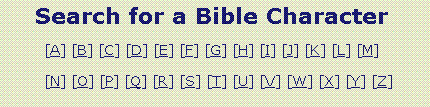
On the Search for a Bible Character, Event, or Location pages, you can select the first letter for the person, event, or location that you wish to search on. For example,
|
Since this website is being built one leg of the hierarchy at a time, only the available searches are listed under each letter. As more pages get added, more and more people, events, and locations will be able to be found.
Back to Top
Menu - Genealogies and Charts
The navigation bar across the top contains a drop down list for going directly to diagrams containing genealogy information and charts with specific interesting information.
The Genealogies are imbedding within the levels of this website. If you select one from the menu bar, you will go to that place within the levels, and can move around from there.
The Charts are separate interesting facts which may or may not be imbedded within the levels of this website. If you select one from the menu bar, you will go to a web page with a table containing that information and links to scripture pages which back up that information.
All pages within this website have the navigation bar across the top. Within this navigation bar, you will find links to the following:
- Home (the top)
- Navigation Tips (this page)
- FAQ (Frequently Asked Questions)
- Genealogies - this drop down list points to the various family trees
- Charts - this drop down list points to the various charts
- Website Status - this gives information about the status of the website
- About Author - this tells about the author
- Contact - use this to send an email to the web master
Back to Top
Site Map
All pages within this website have a link on the left to the Site Map.
The Site Map provides a list of all the pages currently within this website. If the bottom level is not a scripture page, it may be a blank diagram until that leg of the hierarchy gets completed.
The Site Map provides a visual look at the hierarchy of all the levels and allows you to link to any page from there.
Back to Top
Hierarchy Numbers at Bottom

All diagram pages within this website have links at the bottom of the page which correspond to each of the boxes and the previous, next, and up arrows (only as applicable for that page). The sample here shows the links for Creation, which has no previous page link.
You can hover over these hierarchy number links to see the full name of the page before clicking there.
You can use the tab key to get to the hierarchy links, in the case that no mouse is available.
Back to Top